Showing posts with label Android. Show all posts

Saturday, December 8, 2012

Mobile Photo Editor Snapseed Arrives on Android


Popular iOS mobile photo editing app Snapseed has finally made its way to Android.

Snapseed, the creation of 17-year-old Nik software, launched on iOS a little over a year ago. During the past year, the app has seen a whopping 9.5 million downloads and the company was acquired by Google.

“Before we released Snapseed we were primarily focused on [software for] professionals or advanced amateur photographers -– the folks that are buying digital SLRs,” Josh Haftel, product manager at Google, and previously Nik Software, told Mashable. “The application has been really successful for us.”

Along with the launch of the Android application Thursday, Google is knocking the price of the iOS version down from $4.99 to free.

Nik announced it was working on Snapseed for Android in January of this year at CES. Originally slated to launch on a limited number of devices (specifically NVIDA tablets), Nik's acquisition by Google delayed the launch a bit, but also made it so the app will be compatible with more phones and tablets. Thursday’s release is compatible with all phones and tablets running Ice Cream Sandwich or Jelly Bean.

“Our goal was to take a lot of the technologies that professionals around the world have relied on, and make them accessible to anybody,” says Haftel.

Not your average mobile photo editor, the app includes a number of filters and features you won’t find in other photo editing apps. Edits can each be customized to meet your own personal needs. So, you can apply just the right amount of that “Vintage Filter,” or adjust the center point for a particular effect.

“Our goal was to make a tool that would enable you to come up with a creative and customized enhancement,” says Haftel. “Whereas some of the competitive applications out there might just have some predesigned enhancements that you would only be able to do with a single click and not modify it, or conversely have pretty much every tool in the world shoved into a tablet device or a phone, we tried to pick a path in the middle.”

Snapseed has a number of different built-in enhancement options that let you do everything from crop and straighten an image to adjust the focus, many offering choices you might expect to find in a professional photo editor. The Black and White tool, for instance, is the same tool used in Nik’s professional photo editing software. Adjustments are made by simply sliding your finger across the screen to add more or less of whatever you might be working with.

“It’s very simple and straightforward, and also very powerful,” says Haftel. Each enhancement you select can be fine-tuned to the photo you’re working with. So, for instance, if you’re editing a photo of a friend who has a shadow on his face from wearing a baseball cap, you can brighten just his face in the photo rather than the entire image.

When you’re done editing a photo you can save it to the camera roll on your phone, or share it via Google+, Email, Facebook, or Twitter.

“We really love the application,” says Haftel. “We’re really happy to see it getting out there on the Android platform."

Snapseed for Android will be available Thursday in Google Play. Let us know what you think about the photo editor in the comments.

-http://mashable.com

Wednesday, November 28, 2012

Android and iOS Gets Updated, Comes to the UK


Barnes & Noble has updated its Android and iOS Nook app and made it available for download in the UK, the company has announced.

The new features on both platforms include support for British English, French, Italian, German and Spanish.

The iOS app has been optimized for the iPhone 5; it now also supports Apple’s screen magnification and VoiceOver features. The only new feature of note in the Android app is a name change, which will now be “NOOK” instead of (“B&N NOOK”) in your app tray.

Of course, the most important change for both apps is their availability in the UK, which comes weeks after B&N launched its Nook devices in that country.

You can get the iOS version of the app here and the Android one is available here.

-Mashable

Tuesday, November 27, 2012

Android 4.2: More Powerful Android Phone

Google release the latest system, android 4.2. Do you think it's a good news for many android users? In fact, to get android 4.2 on your android phone, lots of samsung galaxy s3 user are looking for the way to update galaxy s3 to android 4.2, if you're using galaxy s3, do you know how to upgrade galaxy s3 to jelly bean 4.2? Don't worry at all, here is provide you an instruction to the quick way to update galaxy s3 with android 4.2 just using Thunderbolt Custom ROM Firmware. Keeping reading this guide, you'll learn more from here.
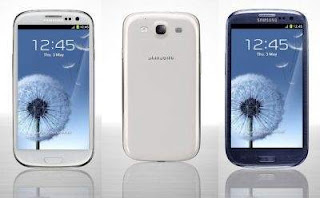
Step 1: Backup your galaxy s3 data, because you have to wipe the system.
Step 2: Start to save the contacts, messages and call logs, and then backup the EFS.
Step 3: Download Thunderbolt Custom ROM, this is a beta android 4.1.2 update. To install this firmware on your phone, you need to root your galaxy s3.
Step 4: Restore the warranty but only update with an official firmware released by samsung,or downgrade galaxy s3 to the stock ROM, then the bootloader will be relocked and the rootaccess revoked.
Step 5: Install a custom recovery image for your galaxy s3.
Step 6: Make sure that you can access a computer using usb cable.
Step 7: Uninstall both galaxy s3 and pc.
Step 8: Check the battery status of your galaxy s3, if there is less than 50% power left go and charge it. The CM10 and AOKP jelly bean software will be stopped.
Step 9: Enable the usb debugging option on your handset.

Update Galaxy S3 with Android 4.2 Thunderbolt Custom ROM Firmware

Step 1: Download the update file.
Step 2: Save the file on your pc.
Step 3: Connect the device with pc using usb cable.
Step 4: Select ROM from your computer and copy, paste it, or drag and drop to the phone'ssd card.
Step 5: Disconnect the galaxy s3 from the computer.
Step 6: Turn off galaxy s3 and reboot into recovery mode.
Step 7: Enter into recovery mode by pressing volume up and the home key and power button simultaneously.
Step 8: Once you enter into recovery mode, start the update operation.
Step 9: Select"wipe data factory reset" and "wipe cache partition". You have to backup galaxy s3 first to avoid losing your personal info.
Step 10: Select "+++go back+++" and return to the main menu.
Step 11: Select "install zip from sd card" and "choose zip from sd card"
Step 12: You can get and apply the ROM, just pick the downloaded file and start the flashing procedure.
Step 13: This installation process will cost a few minutes, don't press anyting.
Step 14: Select "+++go back+++" from the recovery menu follow by "reboot system".

-downloadatoz.com

Tuesday, November 20, 2012

Google’s Android is eating Apple’s lunch

Smartphones and tablets powered by Google’s Android software are devouring the mobile gadget market, eating into Apple’s turf by feeding appetites for innovation and low prices, analysts say.

The Android operating system powered nearly three out of four smartphones shipped worldwide in the recently ended quarter as the mobile platform dominated the market, according to industry trackers at IDC.

Samsung’s Galaxy S3 smartphone is powered by Android.
“Android has been one of the primary growth engines of the smartphone market since it was launched in 2008,” said IDC’s mobile phones research manager Ramon Llamas.

“In every year since then, Android has effectively outpaced the market and taken market share from the competition.”

In tablets, Apple’s market share has fallen to just over 50 per cent from 65 per cent in the second quarter as Android devices gain ground, according to IDC figures.

“Having a lot of people building a lot of things covering a lot of price points with multiple brands in multiple places makes a big difference,” said NPD Group analyst Stephen Baker.

“Variety is strength when it comes to moving units.”

Android smartphones shipments surged to 136 million, topping those in the same three-month period last year by slightly more than 90 per cent, IDC reported.

Samsung’s Galaxy S3 overtook Apple’s iPhone 4S in the third quarter to give the South Korean firm the world’s best-selling smartphone model for the first time ever, according to research firm Strategy Analytics.

“The pace of innovation in Android is faster than Apple,” said Gartner vice-president of mobile computing Ken Dulaney. “They are just trying harder; Apple is way behind in that area.”

Android is benefiting from being an “open-source” platform that gadget makers use free of charge and improve as they deem fit, providing Google with insights along the way.

Apple tightly controls its products from the software to the hardware and even the online shop for music, books, games or other content.

“What you get with Android is this incredible feedback loop with developers, equipment makers, customers, and designers,” Dulaney said.

“At Apple, as long as they have a great vision internally it is fine but they don’t have the feedback Android does.”

Having thousands of different Android devices vying for consumers’ cash is a strength when it comes to market share but puts hardware makers into a fiercely competitive arena, Baker noted.

“Other than Samsung, I don’t know if other Android guys are making money,” the analyst said.

Google gives Android away free, but the platform is crafted to make it easy for people to use the California Internet titan’s money-making services such as search and maps, and get content at its online Google Play shop.

Forrester analyst Charles Golvin said that forces powering Android momentum include changing demographics of smartphone buyers.

Early adopters of smartphones focused more on new technology than on price, but the devices have gone mainstream with cost increasingly important to shoppers, according to Golvin.

“People are more inclined towards the Android platform because there is more choice and most of that choice is low price,” Golvin said.

The open nature of Android and the myriad models offered by gadget makers serve as a “double-edged sword,” warned the analyst.

Apple pushes annual updates of iOS mobile operating system out to its devices, while new versions of Android hit more often but must get through hardware makers and telecom services to get onto people’s handsets.

“You have this lengthy chain of intermediaries who are delaying the delivery of that new software and its innovations to existing devices in the market,” Golvin said.

He backed his point by noting that many Android devices in use still run on generations-old versions of the operating system.

Android gadget variety can also make it tough to design accessories or even “apps” that can be used across the array of devices.

For its part, Google has done an excellent job of improving the “ecosystem” of music, films, apps, books and more available for Android-powered devices, according to analysts.

In the red-hot tablet market effectively created by the iPad, strong growth is being seen by Android rivals including Amazon’s popular Kindle Fire and Nook devices from Barnes & Noble, which run custom versions of the software.

Analysts believe that the Google-backed operating system is likely to spread to typically “dumb” gizmos like appliances.

“These platforms are becoming the molecule elements for building all kinds of hybrid devices,” Dulaney said. — AFP-Relaxnews

Wednesday, November 7, 2012

Android 4.2's four best new features

Some of the Android 4.2 upgrades are minor. Sure, it might be nice to use the Photo Sphere feature to stitch together photos to from Google Street View style panoramic images, but you're not going to do that more than once every blue moon. It's also nice that the 4.2 Play Store app includes a personalized music-shopping function, Music Explorer. Thanks to personalized music services such as Pandora, I really don't need more help in finding new music.

Other new features, however, will want you to make the jump. From least to most important in my book these are:

4) Smart Screen-Savers

Android 4.2's Daydream is actually a smart screen-saver. It lets you display photo slideshows, news headlines, and the like. While you're not likely to use this on a smartphone I know I'll set up a news feed screen-saver on my Nexus 7 tablet and I know my day-trader friends will be setting up market wires on their devices as well.

3) Gesture Typing

Do you use Swype, the popular third-party on-screen keyboard replacement? If you do, then you'll find the same basic functionality to make on-screen keyboards more useful in Gesture Typing. This probably won't be enough to sway hard-core Swype users away from their favorite virrtual keyboard, but it will show screen-typers that there is a better way than using a display keyboard than just as a QWERTY glass keyboard.

2) Miracast: From Tablet and Smartphone to TV

Apple recently introduced AirPlay Mirroring in iOS 5 and Mac OS X, Mountain Lion. With it, you can throw your screen to any Apple TV-equipped television. Android 4.2 will let you do the same thing with any TV, DVD-player, or other media device that supports Miracast.

Miracast is the trade name for Wi-Fi Direct or WiDi. This is an 802.11n compatible network protocol for display-sharing. With a compatible device or a Miracast adapter, you'll be able to stream Internet TV shows and movies from your smartphone or tablet to your TV. Miracast adapters will be available this quarter.

1) Multi-user support

On Android 4.2-powered tablets, but not on smartphones, you'll be able to have multiple users. Each user will get his or her own setup. That means, for example, you can have your own home-screen, background, widgets, apps and games, while your spouse or office partner can have their own unique tablet experience. You can set this up so a new user must login to the tablet or they'll be able to simply hit a button and away they'll go with their own tablet take. -zdnet.com

Tuesday, October 30, 2012

Games : Mega Jump for Android 1.5.2

Get ready to blast off on an epic jumping journey with Mega Jump!

Collect coins, grab crazy powerups, and evade monsters to boost yourself to the edge of the Universe and beyond!

New SMS Permissions are to allow players to use ZONG to purchase Mega Points only. We are not reading your SMS messages, the permissions are solely for ZONG to function. If you do not use ZONG, you will not be billed for ANYTHING.

Known Issues with V1.4:
- Occasional crashes on Samsung Galaxy S 2.
- Screen is not formatted correctly for qHD screens.
- Occasionally, the background will stop loading and will be black.
- NOTE: We are currently working on fixes for all of the issues for the next release.

Mega Jump has got what you need:
- Eye-popping cartoon graphics and beautiful multi-layered backdrops
- Grab the Fireball and Super Nova Mega Boosts and hang on for a fiery ride!
- Collect coins and stars for big points and huge combo boosts!
- Turn into a Balloon! Strap on some Jump Boots! Become a Coin Magnet! Hover with the Action Umbrella or zap enemies with the Power Shield!
- Multiple stages - try to reach the edge of space and beyond!
- Reached the final stage? Try the Hard stages for an extra challenge!
- Watch out for killer items and monsters that'll stop you dead in your tracks!
- Unlock all kinds of awesome new characters to play with!

DOWNLOAD NOW

How to transfer office files from Android to PC

Today, we’ll show you how to easily transfer office files from Android to PC by Kingsoft Office for Android.
Office for Android can support Word format including doc. and docx., Excel format including xls. and xlsx., PowerPoint format including ppt. and pptx. You can create and edit office files by your Android phone with Kingsoft Office for Android and then transfer to PC. There are three types of file sharing:

Method 1. Transfer file by USB cable

The simplest way to transfer a file from your android phone to PC is using a USB cable. Just connect your android and PC via the USB cable and you will see a message on your phone screen asking you what you want to do. The steps are shown as follows:

1. Connect your Android phone to your computer using a USB cable. There will appear a pop-up dialog box asking you how you want to connect the device.

2. Choose 'Connect as hardware'. And the the android phone displayed as hardware.

3. Double-click to open the Android phone. And move the office file created by Kingsoft Office for android to the hard drive.

4. Finally you can directly open the office files via your android phone.


Method 2. Transfer files by Email

You also can share files by sending email to your mailbox, and then open that file by Android phone. The steps are shown as follows:

1. Open the document that you want to transfer to PC.

2. Tap the third button from the right at the top of the main interface screen. This will open a pop-up box containing the options 'Email Document' and 'Send to Cloud Storage'.

3. Tap the 'Email Document' button and you will enter a new interface where it is possible to select documents as email attachments.

4. Enter the email address of your recipient and the title of your message to send the file.

Sunday, October 21, 2012

Android malware, FUD, and the FBI

The Internet Crime Complaint Center (IC3), a U.S. government task force made up of the FBI and the National White Collar Crime Center, recently issued an Android malware warning. This has been taken by some to be yet more proof of how insecure Android is compared to Apple's iOS. Please. Give me a break.

All the IC3's badly written, vague release really said was that: "The IC3 has been made aware of various malware attacking Android operating systems for mobile devices. Some of the latest known versions of this type of malware are Loozfon and FinFisher." And, what are these?

Loozlon is a Trojan horse that Symantec reports as having less than 50 reported instances. FinFisher is a much more serious spyware program.

FinFisher has been around for years on Macs and Windows PCs as "legal" spyware from Gamma International, a UK security company. Recently it's been ported to all the major mobile devices, including Android, Blackberry, and, yes, the iPhone. It is in no way, shape, or form purely an Android problem.

In any case, both programs aren't classic computer viruses. They require users to go above and beyond the call of stupidity to catch them.

With both, you typically need to open a suspicious looking email, then follow a link, and then agree, in Android's case, to download the unknown Android application package (APK). After that, you have to tell your smartphone or tablet to install it even though it's not in Google's Play Store, ignore the malware warning, and then you finally get to infect your device.

In short, these malicious programs don't really infect devices. Maliciously stupid users do. Or, in the case of FinFisher, it might be your employer or your government.

The real problem with Android security though isn't malware that requires a fool's active co-operation. No, the true trouble is that Google still doesn't do anything like enough checking of applications for security risks before it lets them go on the Google Play Store. This is one thing that Apple does do better with its app store than Google does.

The good news is that Google finally seems to be getting it act together in stopping these real threats. According to a report, Google will soon be integrating a malware scanner in the Google Play application store. Neither Google, nor anyone else, can stop fools from being fools, but the search giant is finally working more seriously on solving Android's real security problems.

By Steven J. Vaughan-Nichols (zdnet.com)

Saturday, October 20, 2012

Galaxy S3, wait for Android 4.1?

The Android 4.1 Jelly Bean update will wend its way to Galaxy S3 smartphones in the United States in "coming months," Samsung announced in a press release (see below). The specific launch dates will be revealed by each of the carriers, including AT&T, Sprint, T-Mobile, Verizon Wireless, and U.S. Cellular.

S3 owners will potentially be able to grab Android 4.1 either over the air or through Samsung's Kies software, which downloads the update to a computer and then syncs it with the smartphone. Each carrier will announce its own update method.

eyond a taste of Jelly Bean, the update will bring new features to Samsung's TouchWiz interface and improvements to the camera.

Users will be able to apply different filters to their still and video shots, combine separate video clips directly through the phone, and take advantage of a low-light mode.

People new to the Galaxy S3 will find an easy mode with home-screen widgets for their favorite apps, contacts, and settings. The update will offer different keyboard options, including the Swype keyboard. And users will be able to block incoming calls and alerts for a specific period of time.

Friday, March 19, 2010

Android Gets Official Google Buzz Widget

Google has released the Google Buzz widget for Android, which will make updating your status or tagging your location easier.

Google first launched Google Buzz for mobile about six weeks ago, and while the overall Buzz platform has undergone some changes and refinements, the mobile aspect of the service hasn’t really changed — until now.


One of my favorite Android features is that certain programs will let you use home screen widgets for easy access. This is most useful in a search or a social context — which is why having a widget for Google Buzz makes total sense.

The widget is only available in English right now, and it requires at least Android 1.6. Search “Google Buzz” in the Android Market to download the app. Once it’s downloaded, it can be added to your home screen the same way you add any other widget — click on your home screen menu, click on “add” select “widgets” and then select the option for Google Buzz.