Showing posts with label Facebook. Show all posts

Thursday, November 22, 2012

Firefox and Facebook Messenger can now be BFFs

If you're a Facebook addict with a Firefox craving, or the other way around, a new feature in Firefox will have you salivating. We show you how to use the new Facebook Messenger integration in Firefox.

With Facebook, that means that your Messenger sidebar -- the status updates and friends online -- will be persistent across any site you visit. It's easy to set up and if you know how to use Facebook, you practically know how to use the sidebar, too.

First, make sure you're running at least Firefox 17, log in to Facebook, then go to Facebook's Messenger for Firefox site.

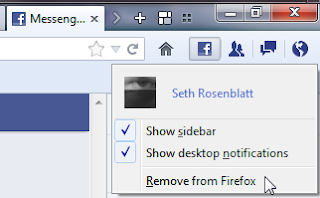
Click the green "turn on" button in the middle of the page, and you'll instantly see the Facebook Messenger sidebar appear. It looks like you're in Facebook, with friends' status updates at the top and friends online below it, but the feature also introduces four buttons to the right of your navigation bar. These let you control the Facebook Messenger integration, including removing it.

The first button links to your profile, as well as letting you hide the sidebar and desktop notifications. This lets you hide either one, or both, to keep distractions to a minimum. You can also disconnect the integration entirely by clicking Remove from Firefox.

The next three buttons will be familiar to Facebook users, and perform the same functions as they do there. The silhouette button lets you accept Friend requests without having to go to your Facebook page, while the dialogue box icon pulls up a list of your recent messages and the globe shows recent notifications.

If you're thinking that this looks a lot like socially-focused alternative browsers like Rockmelt, you'd be right. But that doesn't make it a bad feature for browsers to include by default, especially since so much of what we do in the browser is tied to social networking. -Cnet

Friday, November 2, 2012

iPad Mini & Facebook Scam

You may want Apple’s new 7-inch iPad mini tablet, but don’t click on that offer for a free one making the rounds on Facebook.

The latest scam circulating the social network comes from the Facebook accounts of friends you know and includes Apple’s signature logo. The message promises a free iPad mini for Apple developers:

“Are you a Apple fan ? The Free iPad mini offer is on. Go here – [LINK] to get Free iPad mini,” the message says.

After clicking on the link, the user is directed to a rogue Facebook application and automatically posts a message to their wall, urging friends to participate in the offer.

“Rogue applications like the one shown above can be used to scoop up your personal information, or spread spam and scams rapidly across the social network,” security site Sophos said. “Despite the use of Apple’s world famous logo, the messages have nothing to do with the Cupertino-based firm.”

The scam comes as the launch date of the iPad mini nears (Friday, Nov. 2). Pre-orders for the device sold out quickly online, so the demand to get your hands on the new device is high.

“If you mistakenly installed a rogue app, remove the messages from your timeline, revoke the app’s publishing rights and report it as spam to Facebook, and ensure that you have revoked its access to your account,” Sophos said.

Have you seen this scam on Facebook? Let us know in the comments below.

-http://mashable.com

Sunday, October 21, 2012

4 ways to increase font size in Facebook

Any people complain that the font size of Facebook is quite too small compared to the other websites. Here are four ways to increase the font size of Facebook. Although there can be many other ways of doing this, I’m just covering the basic ones that can be used.

Browsers’ native zoom option
Browsers provide option to modify the view size. Use (Ctrl and +) key or (Ctrl + Mouse scroll up) to increase the text size. You can use (Ctrl and -) key or (Ctrl + Mouse scroll down) to reduce the font size. Although this method is simple, it has some drawbacks, along with the font the whole size will be increased thus breaking the layout.

Browser’s Font settings
Almost every major browser provides an option to set ‘minimum font-size‘. You can customize this option to increase the font size all all webpages. In case of Firefox, you should choose ‘Preferences->Content->Advanced (Fonts & Colors)->Minimum Font size‘.

In case of Google chrome select ‘Settings->(Show Advanced Settings)->Web content->Customize Fonts->Minimum font size‘.

Developer Tools
Developer tools have option to edit the style of the webpages directly. Select mostly the body part and edit the font size in their style editor This is not an easy method for newbies, however it gives you much control over the layout.

Third party Addon / Plugin
You can alternatively install third party tools which does the job of modifying the font size. They in turn use the browser’s native support, but they provide you with better options such as configuring the font / zoom size for each of the website. Beware in choosing the right addon and make sure they don’t gather data from your computer or do other malicious activities.

By Ramkumar (bytechip.com)

Facebook’s First Server Cost $85/Month

At Startup School today in the Memorial Auditorium at Stanford University, Facebook co-founder and CEO Mark Zuckerberg spoke to Y Combinator founder Paul Graham about the early days of Facebook. He revealed that, early on, the team did not intend for the TheFacebook.com (as it was called) to become a business.

In fact, being at Harvard and all, Facebook had no cash to run the business and operated it for the first few months for $85/month, which was the cost of renting one server. Facebook’s first server.

But how did Facebook support its early operations and pay for these wildly expensive servers? Banner ads! Yes, banner ads. As Zuck mentioned in the interview, it was (co-founder) Eduardo Saverin’s job early on to find ads for Facebook to use, as AdSense had just been released, for example. TheFacebook.com had a network of banner ads, but as Zuck implies, they really weren’t making any money. Just enough to pay for those $85 servers.

Facebook, as the story goes, it took about a year for Facebook to reach its first million users. For most, that would be considered speedy expansion, but Zuckerberg implied that (humorously enough) the early constraints on Facebook’s scaling were having to pay for those first servers. Apparently, $85 didn’t come so easy back then.

In terms of expansion, Zuckerberg told the audience the reason the co-founders chose Yale, Stanford and Columbia as the first schools at which they’d launch Facebook, was because they knew it would be tough to succeed at those schools. That was because those three schools already had some kind of simple student social network already established.

http://techcrunch.com

Thursday, October 4, 2012

Hate Facebook’s Promoted Posts?

Facebook announced on Wednesday U.S. users will now be able to promote their personal posts to friends for a fee, but the news is being met with mixed reactions.

Although testing first started in New Zealand in May and has since rolled out to more than 20 countries, those in the U.S. can now pay to make sure your network never misses a big update in your life, from a baby announcement to an event you’re organizing. But each promoted post will cost you $7.

That’s right, you can pay to make sure your content is seen by friends on Facebook. This raises two major questions: Why should you have to pay for something that was once already a part of the site, and does this mean we’ll now inundated with life updates we don’t really care about?

Some argue users might not take advantage of the promoted option, while others believe it could be a great resource for getting news out about bands, garage sales and ticketed events. Facebook seems to think it will make the entire experience better for its users.

Friday, March 19, 2010

Facebook More Popular than Google


Do you know just how popular social networking site Facebook is? Back in February, when Facebook celebrated its 6th anniversary, Facebook’s co-founder Mark Zuckerberg announced that there re more than 400 million Facebook registered uses out there. Some of them access it on their desktop computer, others access the site while on the go, from their mobile devices. There are more than 100 million people that actively use Facebook from their mobile devices.

The number of registered users is proof that Facebook is quite popular. Do you know what else proves Facebook is hugely popular? The fact that Facebook surpassed the Google search engine in weekly hits to become the most visited website in the US of A. According to research firm Hitwise, in the week that ended on March 13, visits to Facebook accounted for 7.07% of web traffic – Google visits accounted for 7.03% - Findmysoft

Friday, March 12, 2010

Facebook Tips/Tricks

If you surf Facebook on daily basis or occasionally, chances are you’re already familiar with regular stuffs like add/delete friends, update statuses, walls and profile, add and explore pages & applications, etc, but there’s more..

This week we want to cover some interesting things you can do on (or with) Facebook; inclusive of tricks that are not documented or unknown to many, as well as tips to stay connected better with your friends. Without further ado, here’s 20 Facebook Tips/Tricks You Might Not Know. If you have interesting tips/tricks related to Facebook, please feel free to share in the comment box below.


  1. How to Place Facebook Chat On Firefox Sidebar

    If you are using Firefox, you can place the Facebook Chat at the sidebar.

    Facebook_Chat_Firefox_Sidebar

  2. How to Download Facebook Photo Albums

    FacePAD: Facebook Photo Album Downloader allows you to download your friends’ facebook albums, Events albums, and Group Albums, en masse, with the click of a button.

    facepad

  3. How to Share Flickr Photos to Facebook

    Flickr2Facebook is an unofficial Flickr to Facebook uploader(bookmarklet) which allows you upload photos to Facebook from Flickr.

    flickr2facebook

  4. How to Update Facebook without Using Facebook

    hellotxt and Ping.fm both introduced features that let Facebook administrators update Facebook Pages.

    hellotxt

  5. How to Schedule Facebook Messages

    Sendible lets you schedule Facebook messages ahead of time so you can send messages to your friends, customers or colleagues in the future.

    sendible

  6. How to "Friend" Someone on Facebook & Hide It From Your Status Updates

    A short tutorial on Makeuseof to guide you how to hide Facebook status updates and keep that fact confined to your closer friends.

  7. How to Create a Photo Collage Using Pictures of Your Facebook Friends

    Click on Friends tab. Proceed to More tab. From "Choose an option" dropdown, choose any of the dashes "" . Your Facebook friends collage is right on your computer screen.

    photo_collage


Read more: Facebook Tips/Tricks