Showing posts with label Firefox. Show all posts

Thursday, November 22, 2012

Firefox and Facebook Messenger can now be BFFs

If you're a Facebook addict with a Firefox craving, or the other way around, a new feature in Firefox will have you salivating. We show you how to use the new Facebook Messenger integration in Firefox.

With Facebook, that means that your Messenger sidebar -- the status updates and friends online -- will be persistent across any site you visit. It's easy to set up and if you know how to use Facebook, you practically know how to use the sidebar, too.

First, make sure you're running at least Firefox 17, log in to Facebook, then go to Facebook's Messenger for Firefox site.

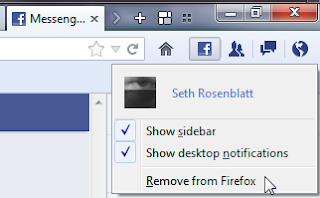
Click the green "turn on" button in the middle of the page, and you'll instantly see the Facebook Messenger sidebar appear. It looks like you're in Facebook, with friends' status updates at the top and friends online below it, but the feature also introduces four buttons to the right of your navigation bar. These let you control the Facebook Messenger integration, including removing it.

The first button links to your profile, as well as letting you hide the sidebar and desktop notifications. This lets you hide either one, or both, to keep distractions to a minimum. You can also disconnect the integration entirely by clicking Remove from Firefox.

The next three buttons will be familiar to Facebook users, and perform the same functions as they do there. The silhouette button lets you accept Friend requests without having to go to your Facebook page, while the dialogue box icon pulls up a list of your recent messages and the globe shows recent notifications.

If you're thinking that this looks a lot like socially-focused alternative browsers like Rockmelt, you'd be right. But that doesn't make it a bad feature for browsers to include by default, especially since so much of what we do in the browser is tied to social networking. -Cnet

Friday, November 16, 2012

Play with Firefox OS in your desktop

You can now get a taste of Firefox OS straight from your desktop browser, thanks to a new Firefox add-on called r2d2b2g that bakes a Firefox OS simulator right into your desktop browser.

Mozilla wrote in its blog post announcing the simulator add-on that the tool has two complementary goals for helping developers. Currently at version 0.7, the company hopes that by version 1.0 the add-on will be stable enough to let developers easily create apps for the new OS.

The second goal for the add-on is that it frees developers from having a device to install a pre-release build of Firefox OS. Given that the Mozilla has said that the initial target audience of Firefox OS will be emerging markets, this could be a boon for developers who may have limited access to multiple mobile devices. It works via the B2G desktop client, which can't emulate device hardware but does have several non-desktop APIs enabled.

Although Mozilla says that it's not having problems getting developers interested, it's hard to imagine that it's not an uphill struggle as Firefox OS joins a crowded field of mobile operating systems. While Symbian is on its way out, and iOS and Android get the most attention from developers, the new Windows Phone 8 and the upcoming BlackBerry 10 will also be clamoring for developer attentions. -Cnet

Thursday, October 11, 2012

Firefox 16 : More HTML5 deemed ready

A new version of Firefox has landed today with a big change for Web developers who prefer the browser, while a large handful of HTML5 gets a green light for browser support from Mozilla.

Firefox 16 (download for Windows | Mac | Linux | Android) makes far fewer sweeping changes than the previous update to Firefox.

A number of HTML5 code has been "unprefixed," which means that Mozilla has decided it has matured enough to run in the browser without causing instability. The newly unshackled HTML5 includes CSS3 Animations, Transforms, Transitions, Image Values, Values and Units, and IndexedDB. Two Web APIs that Mozilla helped to create, Battery API and Vibration API, are also now unprefixed.

These changes help keep Firefox competitive, but it also sends a signal to developers that Mozilla thinks these are good enough to begin baking into their sites. It's a strong endorsement of the "future-Web" tech.

Another nod to developers is the new Developer Command Line. It creates simplified keyboard controls for Firefox's developer tools. Mozilla described it in its blog post announcing today's update as "intuitive, completing commands and parameters for you." While it may not be the sexiest improvement, it does make Web development a bit more accessible. -Cnet

Monday, October 8, 2012

Metro move from Firefox

With only a few weeks to go before Microsoft's big Windows overhaul, Mozilla puts forward its first version of Firefox preview optimized for Windows 8's touch interface.

How to install it
Once you download and run the Firefox Metro Preview (download installer) in Windows 8, you must close Firefox in Metro and Desktop if you already have them installed, then open the Control Panel and set Internet Explorer as the default browser.

From there, run in Desktop mode the Firefox Nightly EXE that you just downloaded and set it as the Default when prompted. A Windows 8 prompt will open, choose Nightly as the default, and then in Firefox, go to Options/Advanced/General and set it as the default browser there, too.

What works and what doesn't -- so far
The Metro Preview version of Firefox is being worked on in an experimental branch of the Firefox Nightly builds called Elm. Erica Jostedt, Mozilla's Senior Manager of Product Communications, confirmed that it doesn't have a ship date yet. "We don't have the set timeline yet -- it's a preview right now that's updated nightly, but on the Elm branch. When it lands on mozilla-central, it's officially on the trains," she wrote in an e-mail to CNET.

"Elm is the experimental repository where most of our Metro development work has been happening. This repository produces nightly builds, much like the Firefox Nightly channel," wrote Asa Dotzler, Firefox's product manager. Those builds will update automatically every day, but they're not part of the regular Firefox release schedule.

It has more features optimized for Windows 8 than Google Chrome does. Chrome's Metro support landed a few months ago, but hasn't seen much public development since then and basically resembles the Desktop mode version. The Firefox Metro Preview also showcases the Australis interface, which remakes Firefox visually to look much more like its Android counterpart. -Cnet Review

Monday, October 1, 2012

Firefox 7 Beta 5 Released

Mozilla recently released Firefox 7 Beta 5, the beta has been made available for Windows, Mac and Linux platforms. Mozilla is planning to release Firefox 7 final by the end of September 2011. Early adopters can install Firefox 7 beta 5 to test the new features. The boost of memory performance is the key aspect of Firefox 7. Mozilla's MemShrink project aims to reduce Firefox's memory consumption and avoid memory leaks in Firefox 7. Mozilla claims that Firefox 7 uses less memory than Firefox 6: often 20% to 30% less, and sometimes as much as 50% less.


The latest version of Firefox beta has the following changes: drastically improved memory use; add a new rendering backend to speed up Canvas operations on Windows systems; bookmark and password changes now sync almost instantly when using Firefox Sync; added support for text-overflow: ellipsis and Web Timing specification; added an opt-in system for users to send performance data back to Mozilla to improve future versions of Firefox. This can be enabled by installing an add-on Fixed several stability issues.

Firefox Beta is the build for those who like a little bit of jeopardy, but who don’t want to risk everything by trying out Firefox Aurora. It gives you a sneak peek at the next version of Firefox with a relatively stable build that’s not quite ready for primetime, but still pretty solid. Whereas Firefox Aurora installs as a completely separate application alongside your existing Firefox installation, Firebox Beta will replace the stable build. Should you subsequently wish to go back to the safer version, you’ll need to manually download the stable version and install it over the top of the beta build. Confirm which build you have by selecting About Firefox from the Firefox menu or button (it’s inside the Help menu if using the Firefox button).

Compared with the recent released Firefox 6, Firefox 7 is a bigger update, with much improved memory management and a host of similar features. There are all the usual improvements including enhancements to Firefox Sync, increased performance for HTML5 Canvas animation and better CSS3 support, but none of those really matter because there's one important improvement that isn't even visible to the user.

The latest Firefox 7 brings a number of fixes to the memory footprint, particularly for users who like to keep multiple tabs open and iconify rather than close their web browser. Other changes include dropping http:// from the awesome bar and painting the sub-domain element of a URL in lighter grey.

As we have seen on previous Firefox versions, there aren't important visible changes in this new release, but, nevertheless Firefox 7 is speedier and comes with bug fixes. Mozilla's next release of Firefox will be known for its significant reductions in memory utilisation, an issue that has dogged Firefox since its first release. Now Mozilla says it has implemented what it calls Memshrink in such a way that it expects somewhere on the order of a 20 to 30 per cent decrease in memory utilisation and sometimes as much as 50% less. In particular, Firefox 7′s memory usage will stay steady if you leave it running overnight, and it will free up more memory when you close many tabs.

Firefox 7 features proper remedy to the age-old memory leak problem. Instead of relying on the user to manually free up memory using the "about:memory" dialog, version 7 takes control of the process itself through increased garbage collection frequency and defragmentation of memory chunks, which will reduce Firefox's memory consumption by tens or even hundreds of megabytes over a lengthy period. In the meantime, how you can stop Firefox's increasing memory demands from spiralling out of control? The answer lies with a tiny add-on appropriately titled Memory Restart.

Memory Restart does two things: first, it displays Firefox's current memory consumption in the Add-ons Bar. This immediately reveals how Firefox's memory demands increase over time, regardless of how it's being used. When Firefox's memory consumption hits 500MB, the text will change to red to warn you that it's in danger of overrunning the rest of your system, telling you it's time to shut down and restart Firefox to free up most of the memory it's snaffled. Memory Restart's other trick is that you can configure it from its Options dialog to automatically restart Firefox when the 500MB threshold is reached, preserving all your open tabs and allowing you to continue browsing without too much hassle. Better still, the arbitrary 500MB figure can be altered to any amount you like, allowing you to tweak Memory Restart according to the amount of installed RAM in your computer.

-http://news.brothersoft.com